
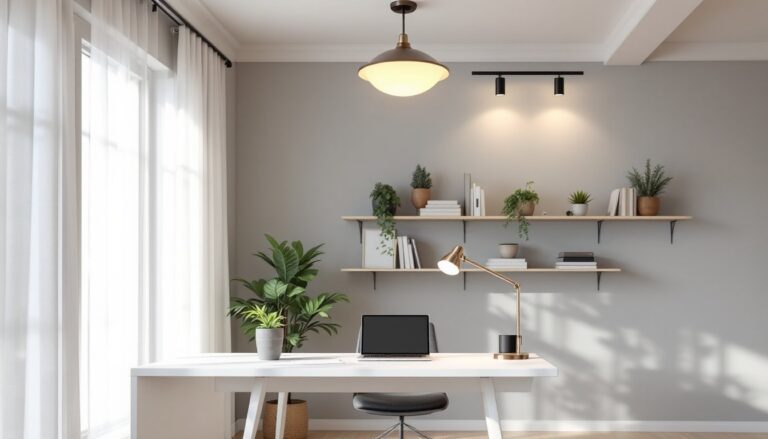
Poor lighting in a home office isn’t just uncomfortable, it causes headaches, eye strain, and tanked productivity. Most people slap up whatever fixture came with the room and wonder why they’re squinting by noon. The right combination of lighting fixtures can transform a dim corner into a functional workspace that keeps energy levels steady through the workday. This guide covers the types of fixtures worth considering, how to choose the right ones for a given space, and installation tips that’ll help homeowners avoid common mistakes.
Table of Contents
ToggleKey Takeaways
- Proper home office lighting fixtures can boost productivity by up to 20% while reducing eye strain, headaches, and errors caused by insufficient illumination.
- Combine task lighting (desk lamps, under-cabinet lights) with ambient lighting (recessed fixtures, flush-mounts, or track lights) to eliminate shadows and provide consistent illumination throughout your workspace.
- Choose cooler color temperatures (4000-5000K) for detail-oriented work and neutral white (3500-4500K) for general tasks to maintain focus and alertness.
- Calculate total lumens needed at 20-30 per square foot for ambient light, and position task lighting to the side of monitors to avoid glare and reduce screen reflection.
- Invest in quality LED fixtures with dimmable controls and evaluate Color Rendering Index (CRI 90+) for color-critical work; LEDs last 25,000-50,000 hours while using 75-80% less energy than incandescent bulbs.
- Always turn off power at the breaker before installation, use a non-contact voltage tester to confirm circuits are dead, and hire a licensed electrician for new circuit runs or work in older wiring systems.
Why Proper Lighting Is Essential for Your Home Office
Good lighting directly impacts how well someone works. Insufficient or poorly placed fixtures force eyes to work harder, leading to fatigue, headaches, and reduced focus. Studies show that proper illumination can boost productivity by up to 20%, while poor lighting increases error rates and slows task completion.
Beyond productivity, lighting affects mood and circadian rhythms. Natural light is ideal, but most home offices need supplemental fixtures to maintain consistent illumination throughout the day. Color temperature matters too: cooler tones (4000-5000K) mimic daylight and promote alertness, while warmer tones (2700-3000K) create a more relaxed atmosphere.
Proper lighting also reduces screen glare, which is critical for anyone spending hours on a computer. Fixtures positioned correctly eliminate harsh shadows and reflections that make monitors hard to read. When planning a productive workspace, lighting should rank alongside desk and chair selection, not as an afterthought.
Types of Home Office Lighting Fixtures to Consider
Task Lighting for Focused Work
Task lighting targets specific work areas, desk surfaces, keyboards, or reading materials. These fixtures provide concentrated illumination where it’s needed most, reducing eye strain during detail-oriented tasks.
Desk lamps are the most common task lighting solution. Look for adjustable models with swing arms or gooseneck designs that allow repositioning throughout the day. LED lamps with dimmer controls offer flexibility: many current models include USB charging ports and touch controls. For desk lamps, aim for 400-800 lumens at the work surface.
Under-cabinet lighting works well for desks built into shelving units or wall-mounted workstations. LED strip lights or puck lights mount underneath overhead cabinets to illuminate the desktop without taking up surface space. These typically draw 3-6 watts per foot and can be hardwired or plugged in.
Clip-on lamps suit temporary setups or spaces where desk real estate is limited. They attach to shelves, monitor arms, or desk edges. While convenient, they’re less stable than dedicated desk lamps and may not provide enough spread for larger work surfaces.
Position task lighting to avoid glare on screens. The fixture should sit to the side of the monitor, not directly behind or in front of it. For right-handed users, placing the lamp on the left reduces shadows while writing: reverse this for left-handed workers. Many home office setup strategies emphasize layering task and ambient lighting rather than relying on a single source.
Ambient Lighting for Overall Illumination
Ambient lighting provides general illumination for the entire room. It fills in shadows created by task lighting and ensures safe movement around the space. Without adequate ambient light, even the best task lighting creates harsh contrasts that tire eyes.
Recessed ceiling fixtures (also called can lights or downlights) are a clean, modern option that works in rooms with at least 7-8 feet of ceiling height. Standard 4-inch or 6-inch housings accommodate LED retrofit kits ranging from 650 to 1400 lumens per fixture. For home offices, space fixtures 4-6 feet apart in a grid pattern to avoid dark spots. Recessed lights require cutting into the ceiling and may need electrical box relocation, consider hiring an electrician if the home has old wiring or if circuits are already heavily loaded.
Flush-mount and semi-flush ceiling fixtures suit rooms where recessed lighting isn’t feasible. Flush-mount fixtures sit tight against the ceiling: semi-flush models hang 4-12 inches down on a short stem. Both styles distribute light broadly, though semi-flush fixtures often provide better spread. Look for models with frosted or diffused shades to prevent harsh glare when seated.
Track lighting offers flexibility for spaces with multiple work zones or where furniture gets rearranged. Individual heads adjust along the track to aim light where needed. Track systems come in single-circuit (all lights on one switch) or multi-circuit (independent control of different sections) configurations. Installation requires mounting the track to ceiling joists or using toggle bolts for drywall-only spans.
Pendant lights hang from the ceiling on cords, chains, or rods. They work well over desks positioned away from walls, but they need adequate ceiling height, at least 8 feet, to avoid head clearance issues. Hang pendants 30-36 inches above the desk surface for optimal illumination without blocking sightlines. Adjustable-height pendants allow fine-tuning after installation.
For ambient lighting, calculate total lumens needed by multiplying room square footage by 20-30 lumens per square foot. A 100-square-foot home office needs 2,000-3,000 lumens of ambient light. Divide this among multiple fixtures rather than relying on a single high-wattage source. According to smart home technology experts, integrating dimmable smart bulbs with voice control or scheduling features allows adjustment throughout the day as natural light changes.
How to Choose the Right Lighting Fixtures for Your Space
Start by assessing the room’s existing conditions. Measure ceiling height, note window placement and orientation, and identify where the desk will sit. North-facing windows provide consistent but cooler light: south-facing windows offer more brightness but may require shades to control glare.
Consider the room’s finish materials. Dark walls, floors, and furniture absorb light, requiring more lumens to achieve the same brightness as a room with light-colored surfaces. As a rule of thumb, dark-finished rooms need 30-50% more illumination than equivalent spaces with white or pale walls.
Pick fixtures based on ceiling type and construction. Standard drywall ceilings accept most fixture types, but installation methods vary. Recessed lighting in rooms below unconditioned attic space requires IC-rated housings (Insulation Contact) to prevent fire hazards. Sloped or cathedral ceilings need angle-cut recessed housings or adjustable pendant stems to hang level.
Match color temperature to the work performed. Detailed tasks like drafting, photo editing, or circuit board work benefit from cooler light (5000-6500K), which reveals fine details and reduces eye fatigue. General computer work, writing, and video calls work well with neutral white (3500-4500K). Avoid mixing drastically different color temperatures in the same room, it creates a disjointed appearance and can cause visual discomfort.
Evaluate Color Rendering Index (CRI) if color accuracy matters. CRI measures how accurately a light source reveals colors compared to natural daylight. For home offices used for design, photography review, or product inspection, choose bulbs with CRI 90 or higher. Standard office work tolerates CRI 80-85. Reviews on home design platforms frequently highlight CRI as a differentiator for high-quality fixtures.
Don’t ignore controls. Dimmer switches allow adjustment based on time of day, task, or personal preference. Not all LED bulbs are dimmable, check compatibility before purchasing. Smart switches and bulbs offer remote control, scheduling, and integration with home automation systems. While pricier upfront, they provide long-term flexibility for adjusting workspace productivity features.
Budget for quality over quantity. A single well-made adjustable desk lamp outperforms three cheap fixed-position models. LED fixtures cost more initially but last 25,000-50,000 hours compared to 1,000-2,000 hours for incandescent bulbs. They also use 75-80% less energy, reducing operating costs. Factor in lumens per dollar, not just purchase price.
Installation Tips for Different Fixture Types
Safety first: Turn off power at the breaker, not just the wall switch, before working on any hardwired fixture. Use a non-contact voltage tester to confirm circuits are dead. Wear safety glasses when drilling overhead, and use a sturdy ladder with a shelf for tools.
Desk lamps and plug-in fixtures require no electrical work beyond plugging them in. Route cords along the back of the desk or through cable management trays to avoid trip hazards. If outlets are scarce, add a surge-protecting power strip rather than daisy-chaining extension cords.
Recessed lighting installation varies by construction type. Retrofit (remodel) housings install from below through a hole cut in the ceiling, these work in finished spaces. New construction housings mount directly to joists before drywall goes up. For retrofit installation:
- Use a stud finder to locate joists and mark the fixture position between them.
- Trace the housing template (usually included) and cut the hole with a drywall saw or hole saw.
- Pull electrical cable to the location if not already present. This often requires fishing wire through walls or attic space, consider hiring an electrician if running new circuits.
- Connect fixture wiring: black (hot) to black, white (neutral) to white, and bare copper (ground) to green or bare wire from the fixture.
- Push the housing into the ceiling opening and secure with the spring clips or mounting brackets provided.
- Install the trim ring and bulb, then restore power and test.
Recessed fixtures must maintain clearance from insulation unless rated for contact. IC-rated housings can touch insulation: non-IC housings require 3 inches of clearance on all sides. Violating this causes overheating and fire risk.
Flush-mount and semi-flush fixtures mount to ceiling electrical boxes. Most residential boxes are 4-inch round or octagonal pancake boxes rated for fixtures up to 50 pounds. Heavier fixtures require a fan-rated box or a box attached to blocking between joists. To install:
- Remove the old fixture and verify the box is securely mounted.
- Connect fixture wires to the house wiring using wire nuts: black to black, white to white, ground to ground.
- Tuck wires into the box and attach the fixture mounting bracket or screws.
- Secure the canopy or base plate, install bulbs, and attach any glass or diffuser components.
Track lighting mounts directly to the ceiling or to a ceiling box with an adapter plate. Determine the track run direction based on joist orientation: mounting parallel to joists requires toggle bolts or finding joist locations. Perpendicular mounting crosses multiple joists, providing solid attachment points. Most track systems include a power feed adapter that connects to a standard ceiling box at one end of the track.
Pendant lights require a ceiling box rated for the fixture weight. Adjust the cord or chain length before final installation, it’s easier to shorten before wiring than after. Many pendants include adjustable cord locks or chain links that can be removed. When installing over desks used for video calls, consider how the fixture appears in the background: oversized pendants sometimes dominate the frame. Testing home technology setups with camera positioning before finalizing installation prevents reshoot-worthy mistakes.
Always follow manufacturer instructions, they take precedence over general guidance. If a project requires running new circuits, upgrading panel capacity, or working in walls with old knob-and-tube wiring, hire a licensed electrician. Permits may be required for substantial electrical work: check local codes through the building department.
Conclusion
Lighting a home office well means combining task and ambient fixtures that match the space, the work, and personal preferences. The right setup reduces eye strain, improves focus, and makes long workdays more tolerable. Take time to measure, plan fixture placement, and choose quality components, proper lighting is one of the most cost-effective upgrades for any workspace.

