
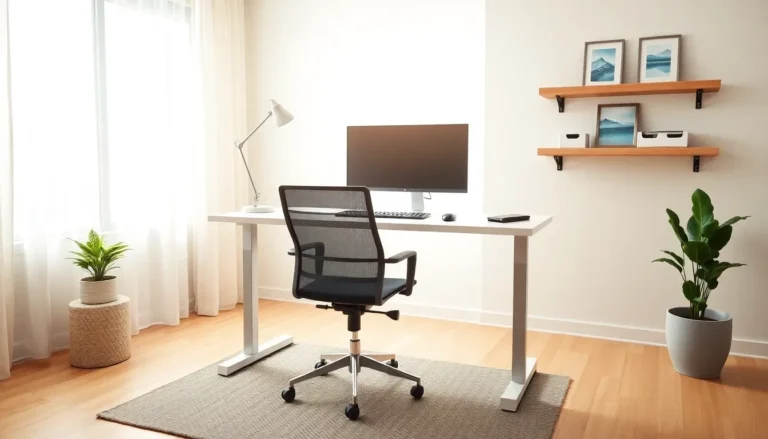
Home office setup ideas matter more than most people realize. A well-designed workspace can increase focus, reduce fatigue, and make remote work genuinely enjoyable. Yet many professionals still work from kitchen tables or cramped corners, wondering why they feel drained by 3 p.m.
The good news? Building a productive home office doesn’t require a massive budget or a dedicated room. It requires smart choices about furniture, lighting, organization, and personal touches. This guide covers practical home office setup ideas that balance productivity with comfort, so work-from-home days feel less like a grind and more like a well-oiled routine.
Table of Contents
ToggleKey Takeaways
- A productive home office setup starts with an ergonomic desk and chair that support good posture and reduce fatigue during long workdays.
- Position your desk perpendicular to windows to maximize natural light while avoiding screen glare for better focus and well-being.
- Use cable management tools and the “touch it once” rule to keep your workspace organized and free of productivity-killing clutter.
- Standing desks allow you to alternate between sitting and standing, reducing lower back discomfort and improving circulation.
- Add low-maintenance plants, calming wall art, and warm textiles to transform your home office setup into an inspiring space you enjoy working in.
- Layer task lighting with ambient lighting and use adjustable LED lamps to reduce eye strain throughout the day.
Choosing the Right Desk and Chair
The desk and chair form the foundation of any home office setup. These two pieces affect posture, energy levels, and overall work quality. Cutting corners here often leads to back pain and distraction.
Desk Selection
A good desk provides enough surface area for a monitor, keyboard, and essential supplies. Standard desks measure 48 to 60 inches wide and 24 to 30 inches deep. This size accommodates most workflows without overwhelming smaller rooms.
Standing desks have gained popularity for good reason. They allow workers to alternate between sitting and standing throughout the day. Electric standing desks adjust height with the push of a button, while manual options use cranks or preset positions. Studies show that standing for portions of the workday can reduce lower back discomfort and improve circulation.
For tight spaces, corner desks or wall-mounted options maximize square footage. L-shaped desks work well for people who need separate zones for computer work and paperwork.
Chair Selection
An ergonomic chair supports the natural curve of the spine. Key features include adjustable seat height, lumbar support, and armrests that allow shoulders to relax. The seat depth should let users sit with their backs against the lumbar support while keeping two to three inches between the seat edge and their knees.
Mesh-back chairs offer breathability for warm environments. Padded leather or fabric chairs provide more cushioning but may trap heat. Budget-conscious workers can add a lumbar pillow to an existing chair as a temporary solution.
The right desk and chair combination transforms a home office setup from tolerable to sustainable for eight-hour workdays.
Optimizing Lighting for Focus and Well-Being
Lighting affects concentration, mood, and eye strain. Poor lighting causes headaches and fatigue. Good lighting energizes and keeps workers alert throughout the day.
Natural Light
Natural light remains the gold standard for home office setup ideas. Position the desk perpendicular to windows rather than facing them directly. This arrangement reduces screen glare while still providing daylight benefits. Workers who sit near windows report higher job satisfaction and better sleep quality.
Sheer curtains or blinds help control brightness during peak sun hours. They diffuse harsh light without blocking it entirely.
Task Lighting
A dedicated desk lamp supplements overhead lighting. LED desk lamps with adjustable brightness and color temperature offer the most flexibility. Cool white light (4000K to 5000K) promotes alertness during morning hours. Warmer tones (2700K to 3000K) reduce eye strain during evening work sessions.
Position the lamp on the opposite side of the dominant hand to minimize shadows while writing or working with documents.
Ambient Lighting
Overhead lights fill the room but often create harsh shadows. Combining ceiling fixtures with floor lamps or wall sconces distributes light more evenly. Dimmer switches allow adjustments based on time of day and task requirements.
A well-lit home office setup reduces the squinting and hunching that lead to afternoon exhaustion.
Organizing Your Workspace for Efficiency
Clutter kills productivity. A disorganized workspace forces the brain to process visual noise before focusing on actual work. Smart organization systems keep everything accessible without creating chaos.
Desktop Organization
The “touch it once” rule helps maintain order. Items used daily belong within arm’s reach. Items used weekly can go in desk drawers. Items used monthly should live on shelves or in storage bins elsewhere.
Cable management prevents the tangled mess that makes desks look chaotic. Cable trays, clips, and sleeves bundle cords neatly beneath or behind the desk. Wireless keyboards and mice eliminate two common cable offenders.
Document trays or vertical file organizers keep papers sorted and off the main work surface. A single tray for incoming documents and another for items requiring action creates a simple processing system.
Digital Organization
Physical clutter has a digital counterpart. A clean desktop screen with organized folders reduces mental friction. Cloud storage services automatically back up files and make them accessible across devices.
Dual monitors expand screen real estate for workers who juggle multiple applications. Monitor arms free up desk space and allow precise positioning at eye level.
Storage Solutions
Bookcases, floating shelves, and filing cabinets extend storage beyond the desk. Matching containers and bins create visual consistency. Labels prevent the guessing game of “which box has the printer paper.”
An organized home office setup saves minutes every day. Those minutes compound into hours of recovered productivity each month.
Adding Personal Touches and Décor
Functional doesn’t have to mean boring. Personal touches transform a workspace from a sterile cubicle replica into a place that actually feels good to occupy. The key is balance, enough personality to inspire, not so much that it distracts.
Plants
Indoor plants improve air quality and reduce stress. Low-maintenance options like pothos, snake plants, and ZZ plants thrive in office conditions with minimal attention. A single medium-sized plant or a few small succulents add life without requiring a green thumb.
Art and Inspiration
Wall art, photos, or a vision board gives the eyes somewhere pleasant to rest during breaks. Choose pieces that motivate or calm rather than images that might trigger stress or sadness. Many people find nature scenes or abstract art work well in home office setups.
A small bulletin board or magnetic strip holds rotating inspiration, quotes, project goals, or family photos.
Color and Texture
Wall color influences mood. Blues and greens promote calm focus. Yellows stimulate creativity. White feels clean but may seem sterile without warm accents.
Textiles like rugs, curtains, and throw pillows add warmth and absorb sound. This matters especially in rooms with hard floors that echo during video calls.
Temperature and Sound
A small fan or space heater maintains comfort when central HVAC falls short. White noise machines or lo-fi music playlists mask distracting household sounds.
These personal elements make a home office setup feel intentional rather than accidental. They signal to the brain that this space is for focused work.

