
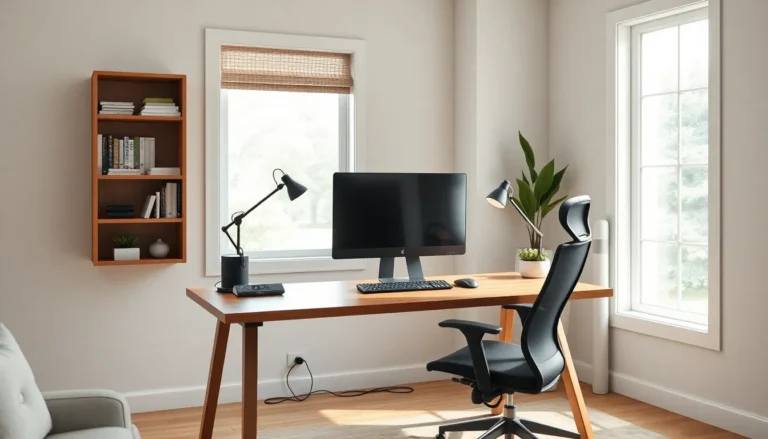
Home office setups can make or break productivity. A well-designed workspace helps people focus, stay comfortable, and get more done. A poorly planned one? It leads to back pain, distractions, and wasted hours.
Remote work isn’t going anywhere. According to recent data, over 35% of workers now have the option to work from home at least part-time. That means millions of people need functional workspaces in their houses or apartments.
This guide covers everything needed to build a home office that actually works. From picking the right spot to choosing furniture, lighting, and organization systems, each section delivers practical advice. Whether someone’s converting a spare bedroom or carving out a corner of the living room, they’ll find useful tips here.
Table of Contents
ToggleKey Takeaways
- Choose a quiet, well-lit location with strong internet connectivity as the foundation of your home office setup.
- Invest in a quality ergonomic chair and properly sized desk to prevent discomfort and long-term health issues.
- Layer ambient, task, and accent lighting to reduce eye strain and boost focus throughout the workday.
- Position your monitor at arm’s length with the top of the screen at or below eye level for optimal ergonomics.
- Organize your home office setup into functional zones and use vertical storage to maximize limited space.
- Build a daily 5-minute tidying habit to maintain an organized, productive workspace over time.
Choosing the Right Location for Your Home Office
Location matters more than most people realize. The best home office setups start with smart placement decisions.
Prioritize Quiet Spaces
Noise kills concentration. A home office near the kitchen or living room invites constant interruptions. Instead, look for areas away from high-traffic zones. Spare bedrooms, finished basements, or even large closets can work well.
If a dedicated room isn’t available, consider using room dividers or bookcases to create visual separation. This signals to household members that the space is for work.
Consider Natural Light
Windows aren’t just nice, they’re functional. Studies show natural light improves mood and energy levels. Position the desk near a window when possible. Just avoid placing screens directly in front of or behind windows, which causes glare and eye strain.
Think About Internet Connectivity
A great home office setup means nothing if the WiFi signal drops constantly. Test internet speeds in different areas of the home. Rooms farther from the router may need a WiFi extender or ethernet connection. Video calls and large file transfers demand stable, fast internet.
Account for Privacy
Some jobs require confidential conversations. Others involve sensitive documents on screen. Pick a location where passersby, whether family members or visitors, can’t easily see or hear work activities. A door that closes makes a big difference.
Essential Furniture and Equipment
Furniture and equipment form the foundation of any home office setup. Investing here pays off in comfort and efficiency.
The Desk
Desk size depends on work style. People who spread out papers and reference materials need larger surfaces. Those who work primarily on a laptop can get by with smaller options. Standing desks have gained popularity for good reason, they allow position changes throughout the day and reduce sedentary time.
Common desk dimensions range from 48 to 72 inches wide. Depth should be at least 24 inches to accommodate a monitor at proper viewing distance.
The Chair
This is not the place to cut corners. A quality office chair supports the lower back, adjusts to body height, and includes armrests. People spend 6 to 10 hours daily in their chairs. Cheap options lead to discomfort and potential long-term health issues.
Look for chairs with:
- Adjustable seat height
- Lumbar support
- Breathable material
- Swivel capability
- Armrests that adjust
Computer and Monitor Setup
Many home office setups benefit from dual monitors. Research indicates dual screens can increase productivity by up to 30% for certain tasks. External keyboards and mice give more flexibility than laptop trackpads.
Monitor placement matters too. The top of the screen should sit at or slightly below eye level. Position monitors about an arm’s length away.
Additional Equipment
Depending on the job, other items may be necessary:
- High-quality webcam for video calls
- External microphone or headset
- Printer/scanner
- Surge protector
- Cable management solutions
Optimizing Lighting and Ergonomics
Proper lighting and ergonomics prevent fatigue and injury. They also make home office setups more pleasant to use.
Layer Your Lighting
Relying on one light source creates harsh shadows and eye strain. Instead, combine three types:
- Ambient lighting – Overhead fixtures that illuminate the whole room
- Task lighting – Desk lamps focused on work areas
- Accent lighting – Optional additions that reduce contrast between bright screens and dark surroundings
LED bulbs with adjustable color temperature work well. Cooler tones (5000K+) promote alertness during work hours. Warmer tones help wind down in the evening.
Set Up Ergonomically
Ergonomics isn’t complicated, but it requires attention to detail. Here’s a quick checklist:
- Feet flat on the floor (or on a footrest)
- Knees at 90-degree angles
- Elbows at 90-degree angles when typing
- Wrists straight, not bent up or down
- Monitor at arm’s length
- Top of screen at or below eye level
Small adjustments make big differences. A monitor stand costing $30 can eliminate neck strain that would otherwise build up over months.
Take Breaks
No home office setup, but perfect, eliminates the need for movement. The 20-20-20 rule helps: every 20 minutes, look at something 20 feet away for 20 seconds. Standing, stretching, and walking around every hour keeps blood flowing and muscles loose.
Organizing Your Workspace for Maximum Productivity
Clutter creates mental noise. Organized home office setups help people think clearly and find what they need fast.
Establish Zones
Divide the workspace into functional areas:
- Primary work zone – Computer, keyboard, mouse, and daily essentials within arm’s reach
- Reference zone – Books, binders, and materials needed occasionally
- Supply zone – Pens, paper, sticky notes, and other consumables
Keep the primary zone minimal. Only items used multiple times daily deserve prime desk real estate.
Go Vertical
Wall-mounted shelves, pegboards, and floating storage free up desk space. They also keep important items visible and accessible. Vertical organization works especially well in smaller home office setups where square footage is limited.
Manage Cables
Tangled cords look messy and make cleaning difficult. Cable trays, clips, and sleeves keep wires organized. Label cables at both ends to avoid confusion when troubleshooting or rearranging equipment.
Use Digital Organization Too
Physical organization matters, but so does digital. Create consistent folder structures for files. Use clear naming conventions. Schedule regular time to delete unnecessary documents and clean up the desktop. A cluttered screen is just as distracting as a cluttered desk.
Build Daily Habits
The best home office setup won’t stay organized without maintenance. Spend five minutes at the end of each workday tidying up. Return items to their places. Clear the desk surface. This small habit prevents chaos from building up over time.

