
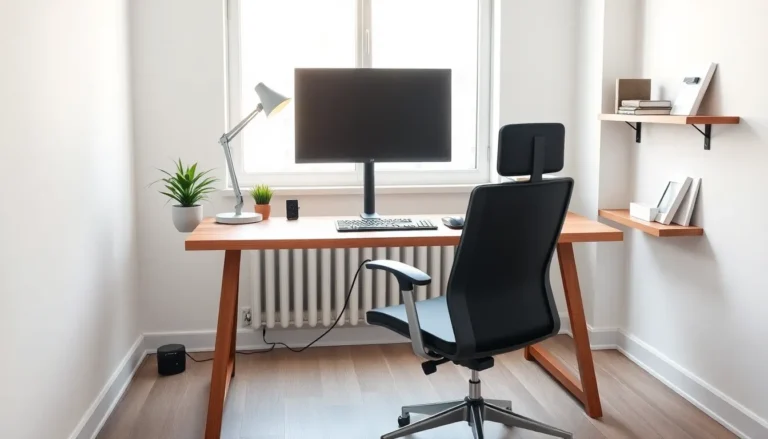
Finding the right top home office setups can transform how people work from home. A well-designed workspace boosts productivity, reduces physical strain, and makes daily tasks more enjoyable. Whether someone needs a minimalist desk or a fully equipped creative studio, the setup matters more than most people realize.
Remote work has become standard for millions of professionals. Yet many still work from kitchen tables or cramped corners that hurt both focus and posture. This guide explores proven home office setups that balance function, comfort, and budget. Each approach addresses different work styles and space constraints.
Table of Contents
ToggleKey Takeaways
- Top home office setups share essential elements: a quality desk and chair, proper lighting, reliable technology, and effective storage solutions.
- Minimalist setups reduce visual clutter and stress while costing less to create and maintain.
- Ergonomic home office setups prevent chronic pain by supporting proper posture with adjustable chairs, sit-stand desks, and correctly positioned monitors.
- Creative professionals need specialized equipment like color-accurate displays, powerful computers, and drawing tablets to support their workflows.
- Budget-friendly setups are achievable through used furniture, refurbished technology, and DIY solutions—prioritize spending on a quality chair first.
- A second monitor can boost productivity by 20-30%, making it a worthwhile investment for any top home office setup.
Essential Elements of an Effective Home Office
Every successful home office setup shares certain core components. These elements form the foundation for any workspace, regardless of style or budget.
Quality Desk and Chair
The desk serves as command central. It should offer enough surface area for a monitor, keyboard, and essential items. Standard desks measure 48-60 inches wide, though smaller spaces work with 36-inch options. Depth matters too, aim for at least 24 inches to maintain proper distance from screens.
A supportive chair prevents back pain and fatigue. Look for adjustable height, lumbar support, and armrests. People spend 6-8 hours sitting daily, so this isn’t the place to cut corners.
Proper Lighting
Natural light improves mood and reduces eye strain. Position the desk perpendicular to windows to avoid glare on screens. Task lighting fills gaps when daylight fades. LED desk lamps with adjustable brightness work well for most top home office setups.
Technology Essentials
A reliable internet connection forms the backbone of remote work. Most professionals need minimum 50 Mbps download speeds for video calls and file transfers. A second monitor increases productivity by 20-30% according to multiple workplace studies. Cable management keeps the space tidy and prevents accidents.
Storage Solutions
Clutter kills concentration. Shelving, filing cabinets, or drawer units keep supplies organized. The best storage fits the work type, designers need space for samples while accountants require document filing.
Minimalist Home Office Setup
A minimalist home office setup prioritizes clean lines and reduced visual noise. This approach works especially well in small apartments or shared spaces.
The core philosophy: keep only what serves a direct purpose. A floating desk mounted to the wall saves floor space. A simple task chair replaces bulky executive seating. One plant or art piece adds warmth without creating clutter.
For technology, minimalists often choose all-in-one computers or laptops with a single external monitor. Wireless peripherals eliminate cable tangles. A small drawer or single shelf holds necessary supplies.
Color schemes stay neutral, whites, grays, and natural wood tones dominate. This creates a calm environment that supports focus. Studies show visual clutter competes for attention and increases stress hormones.
Minimalist top home office setups cost less to create and maintain. They also adapt quickly when needs change. The trade-off? Limited storage means digital organization becomes essential. Cloud storage and paperless workflows complement this setup style perfectly.
Ergonomic Home Office Setup
An ergonomic home office setup centers on body mechanics and health. Poor posture causes chronic pain that affects millions of remote workers. The right equipment prevents these problems.
Chair Selection
Ergonomic chairs support the spine’s natural curve. Key features include adjustable seat height, lumbar support, and armrests that position elbows at 90 degrees. High-end options like the Herman Miller Aeron or Steelcase Leap cost $1,000+, but mid-range alternatives from brands like Branch or Autonomous deliver solid support for $300-500.
Desk Configuration
Sit-stand desks allow position changes throughout the day. Electric models adjust with a button press. The ideal setup alternates between sitting and standing every 30-60 minutes. Monitor arms position screens at eye level, roughly 20-26 inches from the face.
Keyboard and Mouse Placement
Split keyboards reduce wrist strain. Vertical mice keep forearms in neutral positions. Both should sit at elbow height with shoulders relaxed.
Additional Ergonomic Tools
Footrests support shorter users whose feet don’t reach the floor. Monitor risers elevate laptop screens to proper height. Anti-fatigue mats cushion standing sessions.
Investing in ergonomic top home office setups pays dividends through reduced medical costs and increased daily comfort. Many employers now reimburse home office equipment, making these upgrades more accessible.
Creative Professional Home Office Setup
Creative professionals, designers, video editors, photographers, and artists, need specialized home office setups that support their craft.
Display quality matters most for visual work. Color-accurate monitors with IPS panels show true-to-life images. Graphic designers often use 27-inch 4K displays or larger ultrawide screens. Video editors benefit from dual-monitor configurations that separate timelines from preview windows.
Processing power drives creative workflows. Heavy files require computers with dedicated graphics cards, 32GB+ RAM, and fast SSD storage. External drives provide backup and archive space for project files.
Drawing tablets connect traditional art skills to digital tools. Wacom remains the industry standard, though alternatives from Huion and XP-Pen offer budget-friendly options. Some creators prefer pen displays that allow direct drawing on screen.
Sound equipment supports audio work and video calls. Quality headphones reveal audio details that laptop speakers miss. USB microphones improve voice clarity for client calls and voiceover work.
Creative top home office setups often include inspiration boards, reference materials, and room for physical samples. Good lighting supports photography and video production. Acoustic panels control echo in recording spaces.
These workspaces reflect personal style more than other setup types. Color, texture, and visual interest fuel creative thinking.
Budget-Friendly Home Office Setup
A functional home office setup doesn’t require thousands of dollars. Smart shopping and creative solutions build productive workspaces on tight budgets.
Furniture Savings
Used office furniture offers dramatic savings. Corporate liquidation sales, Facebook Marketplace, and thrift stores sell quality desks and chairs at 70-80% discounts. IKEA provides affordable new options, their BEKANT desk and MARKUS chair remain popular budget picks.
DIY solutions work too. A solid-core door on sawhorses creates a large desk surface for under $100. Repurposed bookshelves become standing desks with proper height adjustment.
Technology on a Budget
Refurbished computers perform like new at reduced prices. Apple and Dell sell certified refurbished machines with warranties. Used monitors from previous-generation models deliver excellent value.
Free software handles many professional tasks. Google Workspace, Canva, and DaVinci Resolve provide powerful tools without licensing fees.
Space Optimization
Small spaces benefit from vertical storage. Wall-mounted shelves and pegboards organize supplies without taking floor space. Closet conversions create private offices in studios and one-bedroom apartments.
Prioritize Spending
Budget-conscious buyers should invest most in the chair. Bodies feel the difference between $50 and $200 seating within weeks. Everything else can upgrade over time as funds allow.
These top home office setups prove that good design doesn’t require deep pockets. Function beats aesthetics when budgets are limited.

