
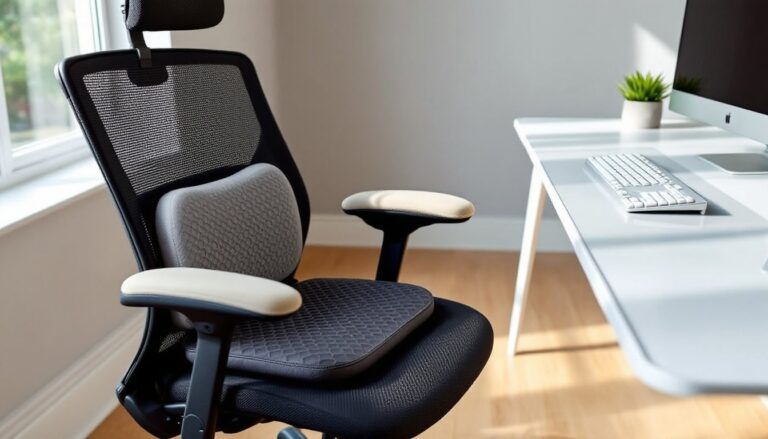
Setting up a home office isn’t just about buying a desk and plopping a chair in front of it. The reality? Most stock office chairs, even pricey ones, don’t fit every body or work style right out of the box. That’s where accessories come in. Adding the right cushions, supports, and protective gear can fix pressure points, protect your floors, and extend the life of your chair without replacing the whole setup. Whether you’re converting a spare bedroom or carving out a corner in the basement, these targeted upgrades deliver measurable comfort and function without a full furniture overhaul.
Table of Contents
ToggleKey Takeaways
- Office chair accessories eliminate discomfort and prevent wear without requiring a full furniture replacement, targeting specific pain points like lower back strain and poor seat padding.
- Lumbar support cushions and memory foam seat pads address the two biggest pressure zones, with mesh versions offering better breathability and customizable thickness for different tasks.
- Chair mats with polycarbonate construction protect both flooring and chair longevity, with beveled edges preventing tripping and proper sizing ensuring the chair’s full rolling radius stays protected.
- Armrest covers and padding can improve comfort during long typing sessions, though careful installation and measurement are essential to avoid interfering with desk clearance.
- Proper placement and measurement of office chair accessories—from cushion height to mat dimensions—ensure ergonomic benefits without creating new strain or instability.
Why Office Chair Accessories Matter for Your Home Office
Most office chairs ship with one-size-fits-all padding and fixed armrest heights, which rarely align with individual posture needs or desk configurations. Over time, sitting in a poorly fitted chair leads to lower back strain, hip discomfort, and circulation issues, all preventable with targeted add-ons.
Accessories also address wear and tear. Standard nylon casters scratch hardwood and laminate: fabric armrests fray and compress: mesh seats lose support after a year of heavy use. Swapping or layering accessories costs a fraction of a new chair and solves specific problems instead of gambling on another generic model.
From a practical standpoint, accessories let you adapt a chair to different tasks. A gel seat cushion works well for long video calls, while a firmer lumbar pillow supports hours of leaning forward during drafting or coding. This modularity is especially useful in shared home offices where multiple people use the same chair.
Finally, protective add-ons preserve your flooring and the chair itself. A quality chair mat distributes weight evenly and prevents dents in carpet or gouges in wood, while armrest covers stop oils and friction from degrading foam padding. Think of accessories as preventive maintenance, they keep both your body and your investment in better shape.
Essential Comfort-Enhancing Accessories
Comfort accessories address the two biggest pressure zones: your lower back and your seat. These add-ons compensate for fixed lumbar curves, thin factory padding, and chairs that don’t match your height or sitting style.
Lumbar Support Cushions and Back Pillows
Mesh lumbar supports attach to the backrest with adjustable straps and push your lower spine into proper alignment. Look for models with dual strap systems, top and bottom anchors prevent the cushion from riding up as you shift. Mesh versions breathe better than foam, which matters during summer months or in rooms without AC.
Memory foam back pillows work for chairs with wide, flat backrests that offer no contour. These typically measure 12–14 inches wide and feature elastic straps or non-slip backing. Position the thickest part of the pillow at the small of your back, roughly 6–8 inches above the seat pan. If it sits too low, you’ll slump: too high, and it forces your shoulders forward.
Some pillows include adjustable inserts or removable foam layers, letting you dial in thickness. This is useful if you switch between tasks, less support for relaxed browsing, more for focused keyboard work.
For chairs with built-in lumbar knobs or inflatable supports that have worn out, aftermarket cushions often outperform replacements. They’re faster to install (no tools, just straps) and cost $20–$50 versus $100+ for OEM parts.
One caution: if your chair already has aggressive lumbar projection, adding a thick cushion can over-arch your spine. Test with a rolled towel first to gauge the right amount of fill before buying.
Seat Cushions and Memory Foam Pads
Gel seat cushions distribute weight across a honeycomb or egg-crate structure, reducing pressure on your tailbone and sit bones. They’re ideal for thin mesh seats or chairs with sagging foam. Most gel pads measure 16 x 16 inches or 18 x 18 inches, check your seat pan dimensions before ordering. A cushion that overhangs the edges will slide around: one that’s too small concentrates pressure at the edges.
Memory foam seat pads range from 2 to 4 inches thick and typically include a non-slip rubber base. Thicker pads suit shorter users who need extra height to keep feet flat and knees at 90 degrees. Thinner pads work better for taller people who don’t want their thighs jammed under the desk.
Look for high-density foam, at least 50 lbs/ft³, which resists bottoming out. Cheap foam compresses within weeks, leaving you sitting on a flat fabric pancake. The cover should unzip for washing: fabric blends with polyester and spandex hold up better than cotton, which pills and stretches.
Coccyx cutout cushions feature a U-shaped notch at the back, eliminating direct pressure on the tailbone. These help if you’ve had a tailbone injury or experience numbness after sitting for more than an hour. The cutout shouldn’t be so deep that it destabilizes your pelvis, aim for a notch about 3 inches deep.
Cushions add height, so account for that in your desk ergonomics. If a 3-inch pad raises your hips, you may need to lower the chair or raise your keyboard tray to maintain neutral wrist position. Ignoring this can trade back pain for wrist strain.
Some DIYers experiment with layering a thin gel pad over a memory foam base for combined pressure relief and shock absorption. It works, but make sure the stack doesn’t exceed 4–5 inches total, beyond that, you lose seat stability and the chair’s hydraulic cylinder may struggle with the altered weight distribution.
Protective and Functional Add-Ons
Protective accessories extend the lifespan of both your chair and your flooring. They also reduce noise, improve mobility, and prevent the kind of surface damage that’s expensive to repair.
Chair Mats and Floor Protectors
Polycarbonate mats are the workhorse choice for hardwood, laminate, and tile. They’re clear, rigid, and resist cracking under wheeled chair traffic. Standard sizes run 36 x 48 inches for compact desks or 48 x 60 inches for L-shaped setups. Thickness matters: 1/8-inch mats suit hard floors, while 1/4-inch or thicker versions work on low-pile carpet (up to 3/8 inch nap).
Mats with studded undersides (also called cleats or grippers) anchor into carpet fibers to prevent sliding. Don’t use studded mats on hardwood, they’ll dimple the finish. Smooth-bottom mats pair with hard floors and often include a textured top surface to reduce wheel slippage.
For eco-conscious DIYers, bamboo or cork chair mats offer a natural look but require more upkeep. They scratch more easily than polycarbonate and may warp in humid basements or sunrooms. If you go this route, apply a polyurethane sealer every 12–18 months to resist moisture and staining.
Mat placement: center it so the chair’s full rolling radius stays on the mat, including when you lean back or swivel. If the casters hit the mat edge repeatedly, the lip will chip or crack. Many homeowners also appreciate how contemporary furniture pieces complement well-chosen workspace accessories, creating a cohesive office aesthetic.
PVC mats are the budget option, $20–$40 versus $60–$120 for polycarbonate, but they yellow under UV exposure, emit a plastic smell when new, and crack faster. If you’re setting up a temporary home office, PVC is fine: for a permanent workspace, polycarbonate pays off.
One overlooked detail: beveled edges. Mats with tapered sides (typically 1/16-inch slope) prevent tripping and let wheeled casters roll on and off smoothly. Sharp-edged mats catch wheels and create a lip you’ll stub your toe on in the dark.
Armrest Covers and Padding
Neoprene or memory foam armrest covers slip over existing armrests and secure with Velcro or zipper closures. They’re useful if your chair’s factory padding has flattened or if hard plastic armrests dig into your forearms during long typing sessions.
Most covers fit armrests 10–12 inches long and 2.5–4 inches wide. Measure before ordering, undersized covers slip off, and oversized ones bunch up. Some models include elastic cinch straps at both ends for a snug fit.
If your chair has fixed-height armrests that don’t align with your desk, adding thick padding raises them slightly (typically 0.5–1 inch). It’s not a substitute for adjustable arms, but it can bridge a minor gap.
For chairs with adjustable armrests that wobble or rattle, aftermarket replacement pads often include shim washers or adhesive foam strips to tighten tolerances. This won’t fix stripped threads or broken ratchets, but it reduces lateral play in worn mechanisms.
Gel armrest pads distribute pressure more evenly than foam and stay cooler against skin, which matters in non-air-conditioned rooms. They’re heavier, though, and may not stay in place on chairs with narrow or angled armrests.
Some DIY enthusiasts have found step-by-step project tutorials helpful for custom upholstery solutions when off-the-shelf covers don’t fit unusual armrest shapes. Custom fabric wrapping with foam inserts and contact cement works well if you’ve got basic sewing skills and a staple gun.
One functional upgrade: armrest extenders. These bolt-on brackets widen the armrest surface area, giving more support if you rest your forearms rather than just elbows. They’re less common but available for popular chair models like Herman Miller Aeron or Steelcase Leap. Installation usually requires a hex key and takes about 10 minutes per arm.
Safety note: if you’re disassembling armrests to add padding or extenders, wear gloves, metal brackets and sharp plastic edges can slice fingers. Keep screws and washers organized in a small container: losing a proprietary fastener means ordering a replacement part and waiting.
For those interested in broader workspace improvements, exploring home crafting projects can inspire creative desk organizers and cable management solutions that pair well with chair upgrades.
Avoid over-padding armrests to the point where they interfere with sliding under your desk. Ideally, your forearms rest parallel to the floor when typing, with armrests supporting elbows at a 90-degree angle. If thick pads force your shoulders up or prevent the chair from tucking in, you’ve added too much material.

