
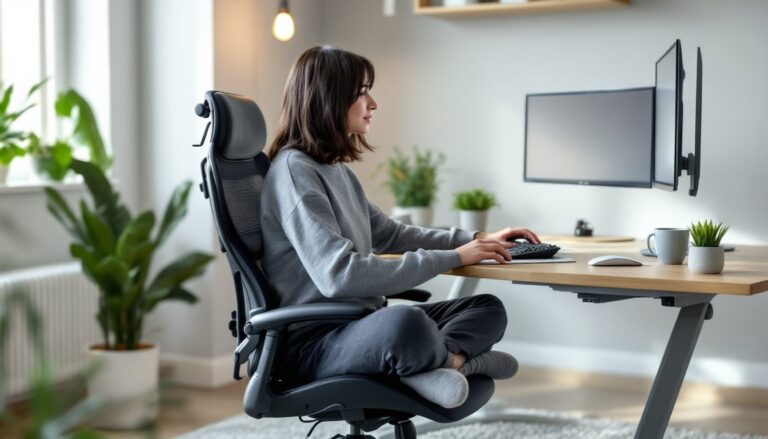
Not everyone works with their feet planted flat on the floor. Some people find cross-legged sitting more comfortable, especially during long stretches at the keyboard. But most office chairs aren’t designed with this posture in mind, cramped seats, rigid armrests, and narrow frames turn what should be comfortable into a balancing act. If you’re setting up a home office and prefer sitting cross-legged, you need a chair that accommodates that position without fighting you. This guide covers what to look for, which chair styles work best, and how to set up your workspace for all-day comfort.
Table of Contents
ToggleKey Takeaways
- An office chair for cross-legged sitting should have a seat width of at least 20-22 inches (ideally 24 inches) and depth of 19-21 inches to provide comfortable support without jamming.
- Four-way adjustable armrests that move up, down, forward, backward, and pivot are essential for accommodating cross-legged postures and preventing clearance issues.
- Wide-seat executive chairs and high-end gaming chairs are the most reliable styles that consistently support cross-legged sitting, while racing-inspired designs with side bolsters should be avoided.
- Your desk height must drop 2-4 inches lower than standard when sitting cross-legged; adjustable-height desks or keyboard trays solve this to maintain proper ergonomics.
- Monitor arms and proper positioning are critical when sitting lower, as your eye level drops significantly—keep the screen top at or slightly below eye level to prevent strain.
- Regular breaks every 30-45 minutes are essential, since even the best office chair setup cannot support any static posture for extended periods without causing stiffness.
Why Sitting Cross-Legged in Your Office Chair Matters
Cross-legged sitting isn’t just a personal preference, it can affect posture, circulation, and overall comfort during work hours. When done correctly in a supportive chair, this position allows the pelvis to tilt slightly forward, which can encourage better spinal alignment compared to slouching with feet dangling.
Many people find cross-legged sitting reduces lower back tension, particularly if they struggle with standard seated postures that compress the lumbar spine. The position also helps some users maintain focus and reduce fidgeting, which matters during long video calls or deep work sessions.
That said, sitting cross-legged in the wrong chair creates problems. A seat that’s too narrow forces the knees up uncomfortably high or out to the sides in an awkward splay. Armrests that don’t move create clearance issues. And chairs with aggressive lumbar bolsters can push the sitter forward, eliminating the deep seating required for this posture.
If cross-legged sitting feels natural to you, designing your workspace around that habit makes more sense than fighting it. The right chair won’t just tolerate the position, it’ll support it for hours without causing hip strain, pressure points, or circulation issues.
Key Features to Look for in Cross-Legged Office Chairs
Not every task chair works for cross-legged sitting. You need specific dimensions and adjustments to make the posture sustainable. Here’s what separates a good match from a frustrating compromise.
Seat Width and Depth Requirements
Seat width is the most critical measurement. A standard office chair seat runs 18 to 20 inches wide, which works fine for traditional sitting but feels cramped when you fold your legs. Look for seats that measure at least 20 to 22 inches across, and ideally closer to 24 inches if you want room to shift positions.
Seat depth matters just as much. You need enough front-to-back space to fully sit back without your knees jamming into the armrests or seat edge. Most ergonomic chairs offer 17 to 19 inches of usable depth, but cross-legged sitters benefit from 19 to 21 inches. Some models include seat depth adjustment, typically via a sliding mechanism under the front edge, which lets you dial in the exact fit.
Pay attention to seat pan shape, too. Chairs with a waterfall edge (a gentle downward curve at the front) reduce pressure behind the knees. Flat, firm cushions provide more stable support for crossed legs than overly soft memory foam that bottoms out under uneven weight distribution.
Measure your own body before shopping. Sit cross-legged on the floor and measure the width of your hips plus the outer edges of your knees, that’s your minimum seat width requirement. Add two inches for comfort.
Armrest Considerations for Flexible Seating
Armrests are often the biggest obstacle to cross-legged sitting. Fixed-height arms force you to either sit lower than ideal or abandon the posture entirely.
Look for 4D adjustable armrests that move up, down, forward, backward, and pivot inward or outward. This flexibility lets you swing the arms out of the way or lower them completely when sitting cross-legged. Width-adjustable armrests are a bonus, they allow you to widen the gap between arms to create more room for your legs.
Some people prefer chairs with removable armrests or flip-up arms that lock in an upright position. These designs, popular in modern design-focused furniture, eliminate clearance issues altogether. Just make sure you won’t miss arm support when typing or during phone calls.
If you’re modifying an existing chair, aftermarket armrest pads or spacers can sometimes create the clearance you need. But for long-term comfort, purpose-built adjustability beats DIY workarounds.
Top Office Chair Styles That Accommodate Cross-Legged Sitting
Certain chair categories lend themselves better to cross-legged postures than others. Here’s a rundown of styles that consistently work.
Wide-seat executive chairs are a natural fit. These typically feature oversized cushions, high weight capacities (often 300 to 400 pounds), and generous dimensions. Look for models marketed as “big and tall” even if you’re average height, the extra width is what you’re after. Expect seat widths in the 21 to 24-inch range.
Gaming chairs often accommodate cross-legged sitting, though quality varies widely. High-end models designed for long sessions include wide bucket seats and highly adjustable armrests. Skip the budget racing-style chairs with fixed or minimally adjustable features, they’re built for looks, not flexibility.
Kneeling chairs and saddle stools encourage active sitting but don’t support cross-legged postures. They’re designed for forward pelvic tilt with legs apart or kneeling, which is a different biomechanical setup entirely.
Floor-style office chairs (also called meditation chairs or legless seats) are built specifically for cross-legged sitting, but they lack the height adjustability needed for standard desk work. They’re better suited to low desks or floor-based workspaces common in some creative home setups.
Mesh ergonomic chairs can work if the seat is wide enough and the mesh tension is firm. Soft mesh slings under uneven weight, creating pressure points. Look for models with reinforced seat frames and adjustable tension controls.
Avoid chairs with heavily contoured seat pans or prominent side bolsters. These features, common in racing-inspired designs, actively prevent cross-legged sitting by limiting hip movement.
If you’re on a budget, consider upcycling or modifying existing furniture rather than settling for a poor fit. Removing armrests, adding a wider seat cushion, or swapping out a gas cylinder for extra height can turn a mediocre chair into a workable solution.
Setting Up Your Home Office for Cross-Legged Comfort
The chair is only part of the equation. Your desk height, monitor placement, and accessories all affect whether cross-legged sitting works long-term.
Desk height becomes critical. When sitting cross-legged, your seated height drops by 2 to 4 inches compared to feet-on-floor posture. If your desk is fixed at the standard 28 to 30 inches, you may end up with your arms too high, causing shoulder strain.
Adjustable-height desks solve this cleanly. Lower the work surface to maintain a 90-degree elbow bend when typing. If you alternate between cross-legged and standard sitting, a sit-stand desk with memory presets lets you save both positions.
For fixed desks, add a keyboard tray mounted below the desktop. Quality trays offer height and tilt adjustment, letting you find the right typing position regardless of seated posture. Look for trays rated for 15 to 20 pounds to support a full keyboard, mouse, and wrist rest without sagging.
Monitor height also shifts. When sitting lower, your eye level drops, which means your monitor needs to come down too. The top of the screen should sit at or slightly below eye level, about 20 to 28 inches from your eyes. Use an adjustable monitor arm rather than stacking books, arms offer precise height, depth, and tilt adjustments.
Footrests are generally unnecessary for cross-legged sitters, but a floor mat or rug can be helpful. If you occasionally drop your feet to the floor to stretch, a cushioned surface reduces fatigue. Commercial anti-fatigue mats designed for standing desks work well here.
Lighting deserves attention. Sitting lower changes your sightlines, which can increase glare from overhead fixtures or windows. Position your desk so windows are perpendicular to your monitor, not behind it. Add a task lamp with adjustable height and color temperature to reduce eye strain during evening work.
Finally, take breaks. Even with a perfect setup, holding any static posture for hours causes stiffness. Stand, walk, and stretch every 30 to 45 minutes. Cross-legged sitting is sustainable when it’s part of a movement routine, not a fixed position.
Conclusion
Choosing an office chair for cross-legged sitting comes down to dimensions, adjustability, and honest assessment of how you actually work. Measure your space, test seat width before buying, and prioritize armrest flexibility. The right setup supports the posture instead of fighting it, and that makes all the difference during a long workday.

