
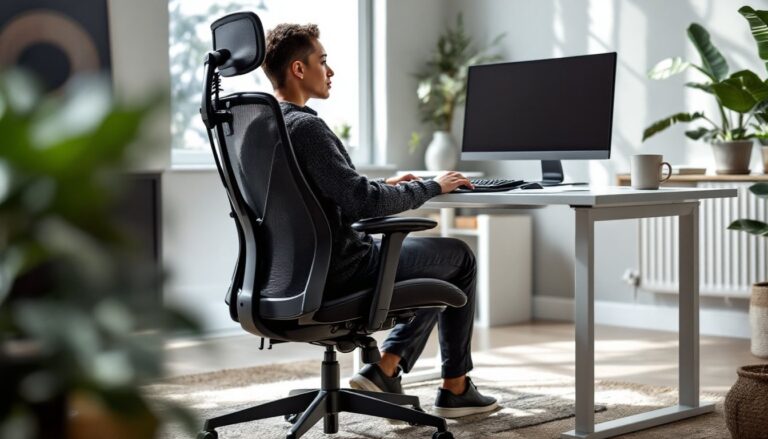
Hip pain doesn’t stop when you sit down, in fact, the wrong chair can make it worse. Whether dealing with bursitis, tight hip flexors, or sciatica that radiates down from the lower back, an eight-hour workday in a poorly designed chair turns every meeting into an endurance test. The right office chair won’t cure hip issues, but it can significantly reduce pressure points, improve alignment, and keep discomfort from derailing your productivity. This guide walks through what makes a chair hip-friendly, which models deliver real relief, and how to dial in your setup for maximum comfort.
Table of Contents
ToggleKey Takeaways
- The best office chair for hip pain features adjustable seat depth (2–4 inches of clearance at the knees), pressure-distributing cushioning, and a gently sloped waterfall edge to reduce nerve compression and improve circulation.
- Proper lumbar support that maintains a neutral or slightly forward pelvic tilt is essential—it opens the hip angle, reduces joint compression, and prevents hip flexor tension during extended sitting.
- Top models like the Steelcase Leap V2, Herman Miller Aeron, and Haworth Fern deliver measurable relief by combining adjustable geometry, quality foam or mesh, and synchro-tilt mechanisms that keep you aligned without static strain.
- Correct chair setup matters as much as the chair itself: set seat height so thighs are parallel to the ground, dial in lumbar support at your belt line, and position your monitor and keyboard to prevent postural collapse.
- Moving every 30–45 minutes—standing, walking, or doing hip circles—is just as important as chair design; static postures restrict circulation even in ergonomic seating.
- Test chairs in person when possible, look for BIFMA X5.1 certification, and pair your chair investment with a height-adjustable desk to alternate sitting and standing, which can reduce hip discomfort by 30–40%.
Why Your Office Chair Matters When You Have Hip Pain
Hip pain while sitting usually stems from three culprits: pressure on the ischial tuberosities (sit bones), poor pelvic alignment, or restricted circulation. Standard office chairs often fail on all three counts.
Most budget chairs feature flat, firm cushions that concentrate weight on a narrow surface area. That pressure compresses soft tissue around the hips and restricts blood flow. Over hours, this creates the deep ache that forces you to shift positions constantly.
Pelvic tilt matters just as much. If a chair’s seat pan slopes backward or lacks proper lumbar support, the pelvis rotates posteriorly (backward). This posterior tilt flattens the natural curve in the lower spine and forces the hip flexors into a shortened position. For someone already dealing with hip impingement or labral tears, that sustained flexion aggravates the joint.
Finally, seat depth and edge design control circulation. A seat that’s too deep forces shorter users to slouch forward or press the backs of their knees against the waterfall edge, the front lip of the seat. That compression pinches the sciatic nerve and restricts venous return from the legs, worsening pain that radiates into the hips.
A chair designed for hip pain addresses these issues with adjustable geometry, pressure-distributing cushioning, and materials that support neutral alignment without forcing the body into static postures.
Essential Features to Look for in a Hip-Friendly Office Chair
Not every “ergonomic” chair works for hip pain. Look for these specific features.
Seat Depth and Cushioning
Seat depth adjustment is non-negotiable. The distance from the backrest to the front edge should allow 2–4 inches of clearance between the seat edge and the back of your knees when you sit fully back. Most quality chairs offer 2–3 inches of travel: measure from your lower back to the back of your knee (popliteal length) before buying.
Cushioning type affects pressure distribution. Memory foam conforms to your shape but can bottom out over time, especially for users over 200 lbs. High-density polyurethane foam (1.8 lbs/ft³ or higher) maintains shape longer. Some chairs use a mesh seat pan, which eliminates pressure points entirely but feels less plush, personal preference varies.
Seat width should accommodate your hips with about an inch of space on each side. Standard chairs run 18–20 inches wide: if you need more room, look for “big and tall” models rated for wider frames.
The waterfall edge should slope gently downward, not square off. This reduces pressure on the underside of the thighs. If a chair lacks this feature, it’ll dig into your legs within an hour.
Lumbar Support and Recline Options
Adjustable lumbar support, both height and depth, lets you maintain the spine’s natural S-curve. For hip pain, proper lumbar support keeps the pelvis in a neutral or slightly anterior (forward) tilt, which opens the hip angle and reduces joint compression. Fixed lumbar cushions rarely align with your actual lumbar spine, especially if you’re shorter than 5’6″ or taller than 6’2″.
Recline tension and lock allow you to shift positions throughout the day. A chair that reclines 110–130 degrees with adjustable resistance lets you open the hip angle periodically, relieving sustained flexion. Look for a multi-position tilt lock, not just upright and full recline.
Some higher-end chairs include synchro-tilt mechanisms, where the seat and backrest recline at different ratios (typically 2:1). This keeps your feet on the floor while reclining, maintaining better circulation than chairs that pitch you backward.
Top Office Chair Recommendations for Hip Pain Relief
Here are proven models that check the boxes for hip-friendly design. Prices reflect 2026 mid-range retail: sales and refurbished units can cut costs by 20–40%.
Steelcase Leap V2 ($900–$1,100): The LiveBack technology flexes with your spine, and the seat glides forward as you recline, keeping the hip angle open. Seat depth adjusts 2.5 inches, and the cushion uses dual-firmness foam, firmer at the edges, softer in the center, to distribute weight. It’s built for 300 lbs and holds up to daily use. The only downside: armrest pads can wear thin after a few years.
Herman Miller Aeron (Remastered) ($1,200–$1,600): The 8Z Pellicle mesh eliminates pressure points entirely, making it ideal for users who run hot or have bony hips. The PostureFit SL lumbar system adjusts independently for sacral and lumbar support. Three sizes (A, B, C) accommodate different body types: size B fits most users 5’4″–6’0″. Mesh doesn’t suit everyone, some prefer cushioning, but for hip pain caused by pressure, this is tough to beat.
Autonomous ErgoChair Pro ($400–$500): A budget option that doesn’t skimp on adjustability. Seat depth slides 2 inches, lumbar height adjusts via a dial, and the recline locks at multiple angles. The mesh backrest breathes well, though the seat cushion compresses faster than premium models. Good for lighter users (under 225 lbs) or those testing whether a better chair helps before committing to a four-figure purchase.
Haworth Fern ($700–$900): An underrated pick. The Wave suspension in the backrest flexes without mechanical parts, and the seat cushion uses foam with gel inserts at the sit bones. It’s narrower than the Leap, so it fits well in tight home offices. The armrests are simple but stable, no wobble. If you like a slightly firmer seat, this delivers.
Secretlab Titan Evo 2024 ($500–$650): Originally a gaming chair, but the 2024 model added adjustable lumbar support and a longer seat depth range. The NEO Hybrid Leatherette wipes clean easily (useful if you eat lunch at your desk). It’s firmer than traditional office chairs, which some users find supportive for hip stability. Not ideal if you need plush cushioning, but worth considering if you want a middle ground between gaming and office ergonomics.
All these models meet BIFMA X5.1 standards for commercial seating, meaning they’ve passed load, stability, and durability testing. Avoid chairs without BIFMA certification unless you plan to replace them in 12–18 months.
If you’re also investing in a best office desk setup, pair your chair with a height-adjustable desk to alternate sitting and standing throughout the day, this alone can cut hip discomfort by 30–40%.
Setting Up Your Chair Properly to Reduce Hip Discomfort
Even a $1,500 chair won’t help if it’s adjusted wrong. Follow this sequence every time you sit down, or whenever you notice pain creeping in.
-
Set seat height first. Plant your feet flat on the floor (or footrest). Your thighs should be parallel to the ground or sloping slightly downward (knees 1–2 inches lower than hips). This opens the hip angle to 90–100 degrees, reducing joint compression. If your feet dangle, use a footrest: if your knees are higher than your hips, raise the seat.
-
Adjust seat depth. Slide the seat pan until there’s 2–4 inches (roughly a fist’s width) between the seat edge and the back of your knees. Sit all the way back against the lumbar support, don’t perch forward.
-
Dial in lumbar support. Position the lumbar cushion at your belt line, where the spine curves inward. It should feel like gentle pressure pushing your lower back forward, not a hard knob digging in. Increase depth until your pelvis tilts slightly forward: this is the anterior pelvic tilt that relieves hip flexor tension.
-
Set armrests. Adjust height so your elbows rest lightly at a 90-degree angle without shrugging your shoulders. Armrests that are too high jack your shoulders up, creating neck tension: too low, and you’ll lean sideways, twisting the pelvis and straining one hip. Width should let your arms hang naturally, not splayed out or pinned to your sides.
-
Adjust recline tension. Set it firm enough that you don’t slam backward when you lean, but light enough to recline without effort. Lock the backrest upright for focused tasks, unlock it for reading or calls.
-
Check monitor height and keyboard placement. Your monitor’s top edge should be at or slightly below eye level, arm’s length away. Keyboard and mouse should sit close enough that you don’t reach forward, which pulls your pelvis off the backrest and collapses your posture. Many workspace layouts described on design-focused sites emphasize aesthetics over ergonomics, prioritize function first.
Re-check every few weeks. Cushioning compresses, mechanisms loosen, and your body adapts. If hip pain returns, run through the setup again before blaming the chair.
Movement matters as much as the chair. Set a timer for 30–45 minutes. Stand, walk a lap around the room, do a few hip circles. Static postures, even “perfect” ones, restrict circulation. Some users integrate budget-friendly workspace hacks like standing desk converters or balance boards to encourage micro-movements throughout the day.
PPE note: If you’re assembling a new chair, wear safety glasses when removing packaging staples or cutting zip ties, those spring back fast. Gloves help when handling metal parts with sharp edges.
Conclusion
Hip pain and desk work don’t have to coexist. The right chair, with adjustable seat depth, proper lumbar support, and pressure-distributing cushioning, can turn an uncomfortable workday into a manageable one. Test models in person when possible, and don’t skip the setup steps. Your hips will thank you by the end of the first week. For broader workspace improvements, explore layout ideas on contemporary design resources that balance form with ergonomic function.

